
Best OCR Software in 2026: What Actually Wins, By Use Case

Table of contents
No single OCR tool wins everywhere. Use a free tool for one-off files, Tesseract or PaddleOCR for clean text, and a cloud API when you have volume. On hard documents like tables and handwriting, the winner changes by document type.
The best OCR software depends on what you scan. Free tools are enough for one-off files, Tesseract or PaddleOCR cover clean text, and cloud APIs win on volume and on hard documents like tables and handwriting. Below is which tool wins in each case, using measured numbers from our 1,700-document benchmark instead of star ratings.
Search "best OCR software" and you get two kinds of pages: listicles ranking tools by opinion and star ratings, and forum threads where a dozen people give a dozen different answers depending on what they were scanning. That is because the tool that wins for receipts on your phone is not the tool that wins for line items on a 40-page invoice PDF, and neither is the tool that wins inside a pipeline processing 50,000 documents a month.
This guide skips the star ratings and works from a different source: the numbers from our own 1,700-document accuracy benchmark, plus the practical differences between tool categories that actually determine which one you should use. Consider this the best OCR software 2026 shortlist built from measured results instead of opinions. Disclosure up front: DocsAPI is our product, and it is included in every comparison below on its actual measured strengths and weaknesses, not just its wins.
What is the best OCR software in 2026?
The best OCR software in 2026 depends on what you are doing with it. For a one-off scan or PDF you need searchable today, a free browser-based tool or the hidden OCR feature in Google Drive covers it. For ongoing personal or small-team document conversion where layout has to stay intact, a desktop or web app with a real OCR engine underneath (not just image-to-text) is worth paying for. For a developer or business building document processing into a product or workflow, a cloud OCR API (AWS Textract, Google Document AI, or DocsAPI) is the right category, priced per page instead of per seat. And for a specific document type like invoices, bank statements, or scanned academic PDFs, the tool that wins is the one tested on that document type, not a generic accuracy score.
Which OCR software is best for your situation?
Instead of one ranked list, here is what actually separates the categories, since most "best OCR software" searches are really asking about a specific one of these.
Best free and open source OCR engines
Tesseract and PaddleOCR are the two real open source options. Tesseract is one of the most widely used open source OCR engines, a long-standing default for typed English text: it is free and runs locally with no cloud dependency. PaddleOCR, built by Baidu, is the stronger open source choice once you move past clean English: in our benchmark it beat Tesseract by 18 to 24 points on multilingual documents and mobile-quality scans. Both require you to run and maintain the software yourself, which is the real tradeoff against a paid API.
Best OCR reader and converter for personal use
A "reader" and a "converter" are answering slightly different questions, even though most tools do both. An OCR reader makes an existing scan or PDF searchable and selectable, so you can find a word or copy a paragraph, without necessarily producing a new file. A converter goes further: it takes an image or scanned PDF and outputs it in a genuinely editable format, a Word document, plain text, or a clean searchable PDF you can annotate and edit like a native file. If all you need is to search inside an old scanned contract, a reader-only tool is enough. If you need to actually edit the text, you need a converter, and that is where layout preservation (does the output keep your tables and headers intact) becomes the real differentiator between tools, more than raw text accuracy.
Adobe Acrobat's online OCR tool covers both for PDF-heavy workflows. For free tools, we tested 11 of them head to head on a real 12-page mortgage application in our free online OCR tools review, only 3 were actually worth using, and the results included a genuinely free option most people do not know about (Google Drive's built-in OCR). If you want to try one right now, our free OCR tool runs in your browser and does not upload your file.
Best OCR API for developers and businesses
Once you are processing documents at volume, whether that is 500 a month or 500,000, a cloud API beats a desktop tool because it is priced per page, scales without you managing infrastructure, and can be built into a pipeline. The three real options are AWS Textract, Google Document AI, and DocsAPI, along with document-parsing tools like Docling (open source) and LlamaParse. We have full head-to-head breakdowns of each pairing: AWS Textract vs DocsAPI, Docling vs LlamaParse vs DocsAPI, and PaddleOCR vs Tesseract vs DocsAPI. If you are replacing a legacy desktop tool like ABBYY FineReader with an API-based workflow, see our ABBYY FineReader alternative comparison.
Best OCR software for a specific business function
If your OCR need is specifically accounts payable and invoice processing, the ranking looks different again because touchless processing rate, not raw character accuracy, is the metric that matters. Our accounts payable OCR buyer guide compares eight AP tools by who they suit and how they fit your ERP.
Are top rated OCR tools actually the best ones?
Most "top rated OCR tools" lists are ranked by one of two things: a review aggregator's star average (G2, Capterra) or the list author's own opinion after trying a handful of tools. Both are useful signals but neither measures accuracy directly. A star rating captures things like ease of setup, customer support, and pricing satisfaction, which matter for a purchase decision but tell you nothing about how a tool performs on your specific documents. A tool can carry a 4.7-star rating from happy users processing clean invoices and still score 30 points lower than a competitor on scanned receipts, because the people leaving reviews were never testing that document type.
That is the gap this guide tries to close: instead of a rating, every recommendation above ties back to a measured score on a specific document category, tested against hand-labeled ground truth rather than user sentiment. Ratings and reviews are still worth checking, especially for signals a benchmark cannot capture (support responsiveness, billing complaints, integration friction), but they should be a second filter after accuracy, not the first.
Which OCR software is most accurate?
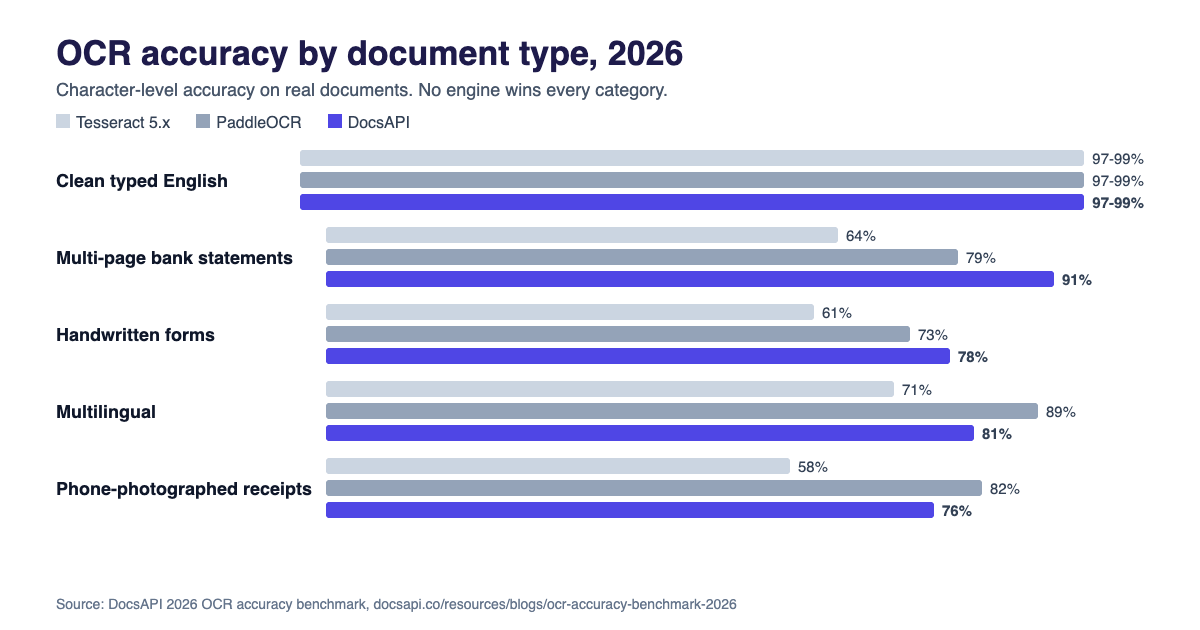
There is no single most accurate OCR software, and any list that gives you one universal winner is simplifying past the point of usefulness. In our benchmark, accuracy split cleanly by document category:
| Document type | Most accurate in our test | Score |
|---|---|---|
| Clean typed English | Tesseract, PaddleOCR, and DocsAPI (tied) | 97-99% |
| Multi-page bank statement tables | DocsAPI | 91% |
| Phone-photographed receipts | PaddleOCR | 82% |
| Multilingual documents | PaddleOCR | 89% |
| Handwritten forms | DocsAPI | 78% |
| Academic papers and scientific PDFs | Docling | 94% |
| Invoice line-item extraction | DocsAPI | 93% |
The pattern holds across all seven categories: the accuracy gap between the best and worst tool on clean text is close to zero, and the gap on hard document types (tables, handwriting, low-quality scans) reaches 20 to 30 points. So "which OCR software is most accurate" only has a useful answer once you know what you are scanning. Full methodology and the complete per-engine numbers are in the accuracy benchmark.
What is the most reliable OCR engine? (Accuracy is not reliability)
Accuracy measures how often a tool gets the text right on a given document. Reliability is a different question: how consistent is that accuracy across a real, mixed document stream, and how mature is the tool underneath it. Two things are worth separating here. First, engine maturity: Tesseract has 20-plus years of active development and the widest deployment base of any OCR engine, which is why it keeps showing up as the default recommendation in developer communities even though it is not the most accurate option on hard documents. Second, consistency: a tool that scores 95% on one document type and 60% on another is less reliable for a mixed real-world stream than a tool that scores 85% across the board, even if its peak number is lower. In our benchmark, DocsAPI and PaddleOCR showed the smallest spread across categories, which is a more useful reliability signal than any single accuracy score.
Cloud API options (AWS Textract, Google Document AI, DocsAPI) add a separate reliability dimension: published uptime commitments and managed infrastructure, versus a self-hosted engine where reliability depends on how you maintain it. If uptime and support matter more to you than the marginal accuracy difference, that pushes the decision toward a managed API over a self-hosted open source engine, independent of which one scores higher on paper.
What mistakes do people make when choosing OCR software?
Four patterns show up repeatedly in how people pick the wrong tool, based on what we see from customers switching to DocsAPI after trying something else first.
Testing on clean sample documents instead of real ones. Every OCR tool performs well on a crisp, well-lit scan. The decision that matters is how it handles your actual document stream, angled phone photos, faded thermal receipts, multi-page tables, which is exactly where accuracy gaps of 20 to 30 points show up. Test on 20 to 50 of your worst real documents, not the best ones.
Trusting a single headline accuracy number. A headline "99% accurate" claim rarely says which documents it was measured on. On clean typed English every engine we tested scored 97 to 99%, so that number tells you little about your files. The number that should change your decision is the accuracy on your specific document type.
Choosing a desktop tool for a workflow that will scale. A paid desktop OCR app feels like the safe choice for a small team, but it does not scale to an automated pipeline without significant rework. If there is any chance your document volume grows past manual processing, starting with an API-based tool avoids a second migration later.
Ignoring table and layout handling. Character-level accuracy on running text is a solved problem in 2026. The differentiator that actually shows up in production is whether a tool can stitch a table across multiple pages, preserve column structure, and handle a document that mixes typed and handwritten fields. Most published accuracy numbers do not test this directly, so ask for it specifically.
How we evaluated this
The category breakdown above comes from testing 8 OCR engines and document APIs on 1,700 real, anonymized production documents against hand-labeled ground truth, not vendor demo samples. Full methodology, the complete document breakdown, and the reasoning behind every number are in the benchmark page, which is free to cite. DocsAPI is our product, so every comparison here reports the categories where it loses (academic papers, mobile-quality receipts, multilingual content) alongside where it wins.
Which one should I pick? The short version
If you want a direct answer instead of a framework, here is the shortlist by situation:
- One-off document, right now, free: Google Drive's hidden OCR (upload, right-click, "Open with Google Docs") or Adobe's free online OCR tool.
- Regular personal or small-team use, layout matters: a paid desktop or web OCR tool. See our 11-tool free OCR test for which free tiers are actually usable first.
- Building OCR into a product or workflow, any volume: a cloud API (AWS Textract, Google Document AI, or DocsAPI), priced per page instead of per seat.
- Mostly clean, typed English documents: Tesseract or PaddleOCR are free and sufficient, the accuracy difference from paid options is close to zero.
- Financial documents (bank statements, invoices): whichever tool wins the multi-page table test, since that is where most engines lose the most ground. Check the per-category table above.
- Academic papers and scientific PDFs: Docling, which led every parser tested on this document type.
- Accounts payable specifically: see the full AP OCR buyer guide, which compares tools by fit and ERP rather than accuracy alone.
If none of these match your exact document mix, answer six questions in our free Which OCR should I use selector and it maps your documents to the tools that won those categories in the benchmark, then test the shortlist on your own files before committing. Whatever you pick, treat this list as a starting shortlist rather than a final answer. OCR accuracy on your documents is the only number that should decide the purchase, and the fastest way to get it is running your own 20 to 50 document test against the two or three candidates that fit your use case, not reading one more ranked list.
Sources and how we checked this
Every accuracy number on this page comes from our own 1,700-document benchmark, which explains the documents, scoring and limits. DocsAPI is our product, so we report the categories where it loses as well as where it wins. Tool descriptions come from each project's own pages, which you can check yourself: Tesseract, PaddleOCR, Docling, AWS Textract documentation and Google Document AI. We do not quote prices here because they change; check each vendor's current pricing page before you decide.
Related guide: how to measure OCR accuracy.
Frequently asked questions
For businesses processing documents at volume, a cloud OCR API (AWS Textract, Google Document AI, or DocsAPI) is the right category, priced per page and built to scale without managing infrastructure. Which one wins depends on document type: our benchmark found DocsAPI leads on financial documents like bank statements and invoices, PaddleOCR leads on multilingual content, and Docling leads on academic and scientific PDFs.
There is no single most accurate OCR software across all document types. On clean typed English, Tesseract, PaddleOCR, and commercial APIs all score 97-99%. On harder documents the gap widens sharply: DocsAPI led on multi-page bank statement tables and invoices, PaddleOCR led on multilingual and mobile-quality scans, and Docling led on academic papers. Match the tool to your document type rather than looking for one universal answer.
Reliability is different from peak accuracy. Tesseract has over 20 years of development and the widest deployment base, making it the most battle-tested option, though not the most accurate on hard documents. For consistency across a mixed real-world document stream, our benchmark found DocsAPI and PaddleOCR had the smallest accuracy spread across categories. For managed uptime and support, a cloud API adds a reliability layer that a self-hosted engine does not have by default.
For a quick, genuinely free option, Google Drive's built-in OCR (upload a file, right-click, open with Google Docs) works on typed text but tends to struggle with tables and layout. We tested 11 free OCR tools on the same 12-page document and found only 2 free tools worth using; the full results, including the traps to avoid, are in our free online OCR tools review.
For occasional PDF-to-editable conversion, Adobe's online OCR tool is the most widely used paid option and handles layout well. For developers or businesses converting PDFs at volume, an API-based option (AWS Textract, Google Document AI, or DocsAPI) is a better fit since it is priced per page and can be automated into a workflow instead of run one file at a time.
It depends entirely on the document type being scanned. In our 1,700-document benchmark, the highest accuracy tool per category was: Docling on academic papers (94%), DocsAPI on bank statements (91%) and invoices (93%), and PaddleOCR on multilingual documents (89%). No single tool posted the highest score across every category, which is the main finding of the benchmark.
For clean, typed, mostly English documents, yes: in our benchmark it tied PaddleOCR and DocsAPI at 97-99%. It falls behind on multi-page tables (64%), phone-photographed receipts (58%) and handwritten forms (61%), so test it on your worst documents before you rely on it. You also have to install, run and maintain it yourself.
Handwriting is the weakest category for every engine we tested. On handwritten forms of mixed neatness, accuracy was 61% for Tesseract, 73% for PaddleOCR and 78% for DocsAPI. Neat block letters read far better than cursive, so expect to review handwritten fields by hand, and check our benchmark for how the scoring worked.
Not by default. Most free web tools upload your file to their servers, and their terms on storage and reuse vary. For confidential documents, use software that runs on your own machine such as Tesseract, or a paid service with a written data handling policy and, where needed, a signed agreement. Read the tool's privacy terms before you upload anything sensitive.
Collect 20 to 50 real documents, including the messy ones (angled photos, faded scans, multi-page tables). Run them through the two or three tools that fit your use case, then compare each output with the correct text by hand and count the errors that would cause you a problem. That small test predicts your results better than any published ranking.
Related Blog Posts
OCR Accuracy Benchmark 2026: 8 Engines on Real Documents
We tested eight OCR engines and document APIs on 1,700 real documents across invoices, bank statements, receipts, and academic papers. The full accuracy numbers, methodology, and per-category winners, free to cite.
How to Measure OCR Accuracy: CER, WER and Field Scores (2026)
Plain definitions of character error rate, word error rate and field level accuracy, a Python script with real output, what score counts as good, and how to test on your own documents.
Document Detection: The Step Everyone Skips Before OCR
Our OCR accuracy jumped four percentage points the day we stopped feeding rotated junk into the engine. Document detection is the cheapest, most-skipped accuracy win in the field.
Want to see it on your own documents?
Try our free OCR tool in your browser, or book a demo to see how DocsAPI reads the document types covered in this guide.