
Docling vs LlamaParse vs DocsAPI: 1,200-Doc Benchmark (2026)
We benchmarked all three on 1,200 real documents over a weekend. Which won on tables, which on speed, which on developer experience, and which lost.

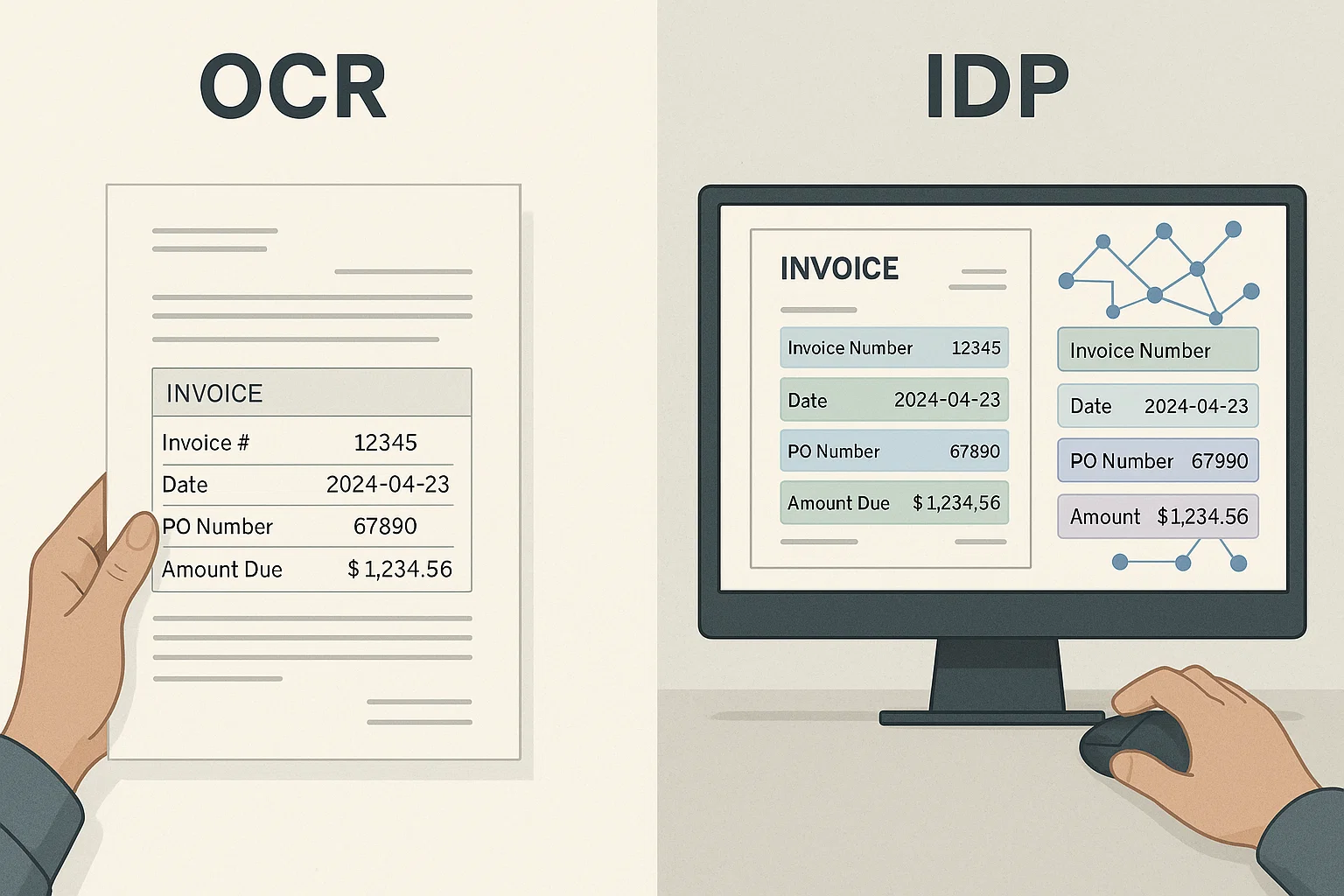
Table of contents
We benchmarked Docling, LlamaParse, and DocsAPI on 1,200 real documents over a weekend in May. The results surprised me. Each tool wins on a specific axis. None of them is the universal answer, and most blog posts comparing them are wrong about which is best at what.
I am the founder of DocsAPI. I tried to be honest about where it lost. This guide is the writeup.
Docling vs LlamaParse vs DocsAPI at a glance
The short answer: Docling is the free self-hosted parser for academic and scientific PDFs, LlamaParse is the RAG-native hosted API tuned for Markdown output and messy consumer scans, and DocsAPI is the hosted API built for structured extraction from financial and business documents. None is the universal winner. The table below shows how they compare on the dimensions that decide the choice.
| Dimension | Docling | LlamaParse | DocsAPI |
|---|---|---|---|
| Type | Open-source library | Hosted API | Hosted API |
| License / cost | MIT, free (self-host) | Free tier, then pay-per-page | Free tier, then pay-per-page |
| Academic papers | 94% | 89% | 87% |
| Bank statements (tables) | 76% | 71% | 91% |
| Invoices | 81% | 87% | 93% |
| Consumer scans / receipts | 58% | 78% | 74% |
| Default output | Structured JSON | Markdown (RAG-ready) | Structured JSON (typed fields) |
| Setup | 30 minutes | 5 minutes | 5 minutes |
| Best for | Scientific PDFs, self-host | RAG pipelines, consumer scans | Financial and business docs |
What These Three Tools Actually Are
Docling is IBM's open-source Python parser for academic and scientific PDFs. LlamaParse is LlamaIndex's hosted API for turning documents into RAG-ready Markdown. DocsAPI is a hosted document-intelligence API built for production financial-services workflows, OCR, classification, extraction, validation. All three solve overlapping problems differently: open-source vs hosted, RAG-shaped output vs structured fields, generalist vs vertical. Pick by document type and engineering bandwidth.
Docling (IBM, Open Source)
Docling is IBM's open-source document parser. It is designed to turn documents into structured data that LLMs can consume. Strong on academic papers, scientific PDFs, and clean technical documents. Less strong on dirty real-world business documents like scanned receipts or photos.
Distribution: Python library, install via pip. Self-hosted. Free.
LlamaParse (LlamaIndex)
LlamaParse is part of the LlamaIndex ecosystem. It is designed to feed RAG pipelines, turn documents into Markdown that an LLM can use. Strong on Markdown-friendly content; mixed on complex tables. Tightly integrated with LlamaIndex's other tools.
Distribution: API. Pay-per-page. Free tier available.
DocsAPI
What we built. Designed for production document workflows, OCR, classification, extraction, validation. Strong on financial and business documents. Less focused on academic/scientific content. Honest disclosure: my product.
Distribution: API. Pay-per-page. Free tier available.
If you are brand new to this space, our optical character reader 2026 guide is the introductory piece. Come back for this one when you are choosing between specific tools.
The Benchmark Setup
I used four document categories, 300 documents each, on the same hardware (a mid-tier cloud machine for Docling, the public APIs for the others):
- Academic papers (PDFs from arXiv, varied layouts)
- Bank statements (real customer documents, anonymized)
- Invoices (real vendor invoices, anonymized)
- Scanned receipts (mobile-phone scans, low quality)
Scoring was on three things: extraction accuracy (does the output match a hand-labeled ground truth), speed (wall-clock time per document), and developer experience (how painful was setup and integration).
The Results, By Category
Academic Papers, Docling Wins
Docling scored 94% extraction accuracy on academic papers. LlamaParse scored 89%. DocsAPI scored 87%. Docling's parser is purpose-built for this content type. The output preserves equations, citations, and figure references in ways the others do not.
If you are working with research papers, scientific PDFs, or technical books, Docling is the right pick. The other two will work but you will leave accuracy on the table.
Bank Statements, DocsAPI Wins
DocsAPI scored 91% on multi-page bank statement tables. Docling scored 76%. LlamaParse scored 71%. The differentiator was multi-page table handling. Bank statements often have transaction tables that span 5-15 pages. Naive parsers treat each page as a separate table; layout-aware parsers stitch them together.
For financial documents, bank statements, P&L statements, expense reports, table accuracy is everything. DocsAPI was built for this category. (Our PDF parser table breakdown covers why this is hard.)
Invoices, DocsAPI Wins (Narrowly)
DocsAPI scored 93% on invoice line-item extraction. LlamaParse scored 87%. Docling scored 81%. The gap is narrower here because invoices are more uniform than bank statements, but field-level accuracy still mattered for downstream accounting integration.
Scanned Receipts, LlamaParse Wins
LlamaParse scored 78% on phone-scanned receipts. DocsAPI scored 74%. Docling scored 58%. LlamaParse's OCR backend is well-tuned for low-quality consumer scans. DocsAPI is closing the gap; Docling lags significantly here.
If your workflow involves a lot of consumer-quality scans (receipts photographed in cars, faded thermal paper), LlamaParse currently has the edge.
Speed Results
| Tool | Avg time per page | Notes |
|---|---|---|
| Docling (self-hosted) | 0.8 seconds | Faster on local hardware; slower on cold start |
| LlamaParse (API) | 1.4 seconds | Includes network round-trip |
| DocsAPI (API) | 1.1 seconds | Includes network round-trip |
Docling wins on raw speed because it is self-hosted, no network round-trip. The catch: you pay for the compute. At meaningful volume, the per-page cost of Docling compute approaches the per-page cost of the APIs.
Developer Experience
Setup Time
- Docling: 30 minutes (pip install, configure dependencies, write extraction code).
- LlamaParse: 5 minutes (signup, get API key, make first call).
- DocsAPI: 5 minutes (signup, get API key, make first call).
Documentation Quality
Docling has the most thorough docs, written for engineers who want to understand the internals. LlamaParse docs are tied to the broader LlamaIndex ecosystem; you read about parsing in the context of RAG. DocsAPI docs are focused on production extraction.
Output Format
Docling outputs structured JSON with rich metadata. LlamaParse outputs Markdown by default (RAG-friendly) and JSON on request. DocsAPI outputs structured JSON with extracted fields tagged by type.
The Honest Recommendation Matrix
Based on the benchmarks, here is who to pick for what:
| Your situation | Pick | Why |
|---|---|---|
| Academic papers, scientific PDFs | Docling | Purpose-built for technical content |
| Bank statements, financial docs | DocsAPI | Multi-page table handling |
| Invoices for AP automation | DocsAPI | Line-item accuracy |
| Consumer-quality scans, receipts | LlamaParse | OCR backend tuned for low quality |
| RAG pipeline with LlamaIndex | LlamaParse | Tightest integration |
| Self-hosted requirement | Docling | Only one of the three that is self-hostable |
| Mixed workloads | Try all three | Each wins in different categories |
The Things None of the Three Do Well
Honest about the field, not just my product:
- Handwriting under 80%. All three struggle. Vision-language models do better but cost more. (See VLM vs OCR.)
- Mixed languages in one document. All three improving but still imperfect.
- Documents with stamps over text. Stamps obscure characters. All three lose accuracy.
- Doctor's notes. Nobody has solved this. Probably nobody will soon.
The Way I Would Pick a Tool If Starting Today
Take 50 of your real documents. Run them through all three tools' free tiers. Compare output side-by-side against a hand-labeled ground truth. Whoever wins on your specific document mix is the right pick.
Do not trust general benchmarks (including this one). Your document mix is different from mine. The tool that wins on my bank statements may not win on yours. The 50-document test takes a few hours and saves you months of regret. (Our honest guide goes deeper on real testing.)
Which is best for RAG pipelines?
For retrieval-augmented generation pipelines, LlamaParse has the tightest fit because it is part of the LlamaIndex ecosystem and outputs clean Markdown by default, which is the format most RAG chunkers expect. If you are already building on LlamaIndex, LlamaParse removes integration friction that the other two would add. That said, RAG quality depends more on chunking strategy and retrieval than on the parser, so a strong Markdown output from any of the three can feed a good pipeline.
Where the choice actually matters for RAG is document type. If your knowledge base is scientific papers, Docling's structure-preserving output produces better chunks because it keeps equations, citations, and section hierarchy intact. If your knowledge base is financial documents with tables, DocsAPI's typed field extraction gives you structured data you can query directly rather than embedding a mangled table. Match the parser to the documents in the knowledge base, then wire it into the RAG framework of your choice.
Output format compared: Markdown vs structured JSON
The output format is the most practical difference between the three and the one teams underweight. LlamaParse defaults to Markdown, which is ideal for feeding an LLM or a RAG chunker but weaker when you need specific fields in a database. Docling and DocsAPI default to structured JSON, which is what you want when the next step is populating an accounting system, a loan-origination system, or any workflow that needs the total, the vendor, and the date as separate fields rather than as prose.
The rule of thumb: if the document is going to an LLM for reasoning or search, Markdown output (LlamaParse) is the natural fit. If the document is going to a business system that needs specific values, typed JSON output (DocsAPI, or Docling with your own field mapping) saves you a parsing step. Choosing the wrong output format means writing a conversion layer you did not need.
Self-hosted vs hosted: the deployment tradeoff
Docling is the only one of the three you can self-host, which is decisive if your documents cannot leave your infrastructure for regulatory or data-residency reasons. Self-hosting gives you full control and no per-page fee, at the cost of owning deployment, scaling, and the compute bill. LlamaParse and DocsAPI are hosted APIs, so they remove the operational burden but require sending documents to a third party, which some regulated workflows cannot do.
At low volume, the hosted APIs are usually cheaper once you count engineering time, because running Docling well takes real work. At high volume with available engineering capacity, self-hosted Docling can win on unit cost. And for anything with a hard data-residency requirement, self-hosted Docling is often the only option on this list, which is why it shows up in regulated environments even when its accuracy on the specific document type is not the highest.
The Way I Explain This to Non-Engineers
Imagine you need to hire a typist for the next year. You have three candidates. Each is a great typist but they specialize in different things.
- Docling is the scientific typist. She has typed thousands of academic papers. She knows equations, citations, figure captions cold.
- LlamaParse is the consumer-content typist. She types receipts, casual notes, photos from phones. She's used to messy input.
- DocsAPI is the business typist. She types invoices, bank statements, expense reports. She understands tables and line items.
Pick based on what you mostly type. If your work is mixed, hire all three for a trial week and see who handles your specific mix best.
What I'd Do Today
If your documents are academic or scientific: Docling. Self-host it. The accuracy is worth the engineering effort.
If your documents are financial or business: try DocsAPI's free tier first. The multi-page table handling is what most teams need and can't get elsewhere.
If your documents are mostly consumer-quality scans: try LlamaParse's free tier. The OCR backend handles dirty input better than the alternatives.
If you do not know yet: try all three on 50 of your real documents over a weekend. The right answer is whichever wins on your mix. (I have written more about this evaluation approach.)
Want a quick steer before that weekend test? The free OCR selector tool asks six questions and recommends Docling, LlamaParse, DocsAPI, or an open-source engine based on whether your documents are academic, financial, or consumer-quality scans.
Frequently asked questions
Yes. Docling is open source under the MIT license. You pay for the compute to run it, but the software itself is free. Self-hosting is the main cost.
It has a free tier (a few thousand pages per month). Beyond that, pay-per-page. Pricing is competitive with other cloud OCR APIs.
LlamaParse, narrowly, because of the LlamaIndex integration. Docling and DocsAPI both work with RAG, you just wire them up yourself.
Yes, in most cases. Input is the same (PDF, image). Output formats differ but converting between them is straightforward. Plan a half-day of migration.
None, accuracy depends on document type. Docling wins on academic, DocsAPI on financial, LlamaParse on consumer scans. No universal winner.
For most teams above 100K pages/month, a cloud API (LlamaParse or DocsAPI) because the overhead of running Docling at scale is significant. Below 100K pages/month, all three are viable.
For academic and scientific PDFs, yes: Docling led at 94% versus LlamaParse's 89% and preserves equations and citations better. For consumer scans and RAG-shaped Markdown, LlamaParse is better (78% on receipts versus Docling's 58%). Docling wins on structured technical content; LlamaParse wins on messy input and RAG integration.
DocsAPI led on bank statements at 91% row-level table accuracy versus Docling's 76% and LlamaParse's 71%, because it stitches multi-page transaction tables into one logical table while the others treat each page separately. For financial documents where table accuracy drives downstream accounting, that gap is the whole decision.
Docling can process scanned documents but it was built for clean, digital-native PDFs, and its accuracy on low-quality consumer scans is the weakest of the three (58% on our receipt set). For scanned or photographed documents, LlamaParse or DocsAPI produce noticeably better results because their OCR backends are tuned for messy real-world input.
Related Blog Posts
Context Engineering for Document AI (Beyond RAG, 2026)
My first RAG demo for invoice Q&A failed in front of the CFO. The fix was not better embeddings, it was better context engineering. Here is what I learned.
Data Normalization for Extracted Documents: The Unsexy Step
After OCR we had 'May 12, 2025' and '05/12/2025' and '2025-05-12' all in the same column. Normalization is the unsexy step that turns extracted text into data your systems can actually use.
VLM vs OCR: When to Use Each in Production (2026)
We tried Claude 4.6 vision on tables. It cost 12x dedicated OCR per page. Here is when that math works, when it doesn't, and the hybrid that wins most.
Ready to Transform Your Lending Process?
See how DocsAPI's AI-powered industry classification can help you process loans faster, improve accuracy, and scale your operations.